Fifteen years of hands-on technical notes: Linux, Kubernetes, AWS, databases, networking, and the home lab.
The workshop archive: hands-on notes from fifteen years of building things, spanning Linux, Kubernetes, AWS, databases, and the home lab. I keep these here because the best architecture advice comes from people who have actually done the work. For current writing on technology strategy and AI adoption, see Posts.
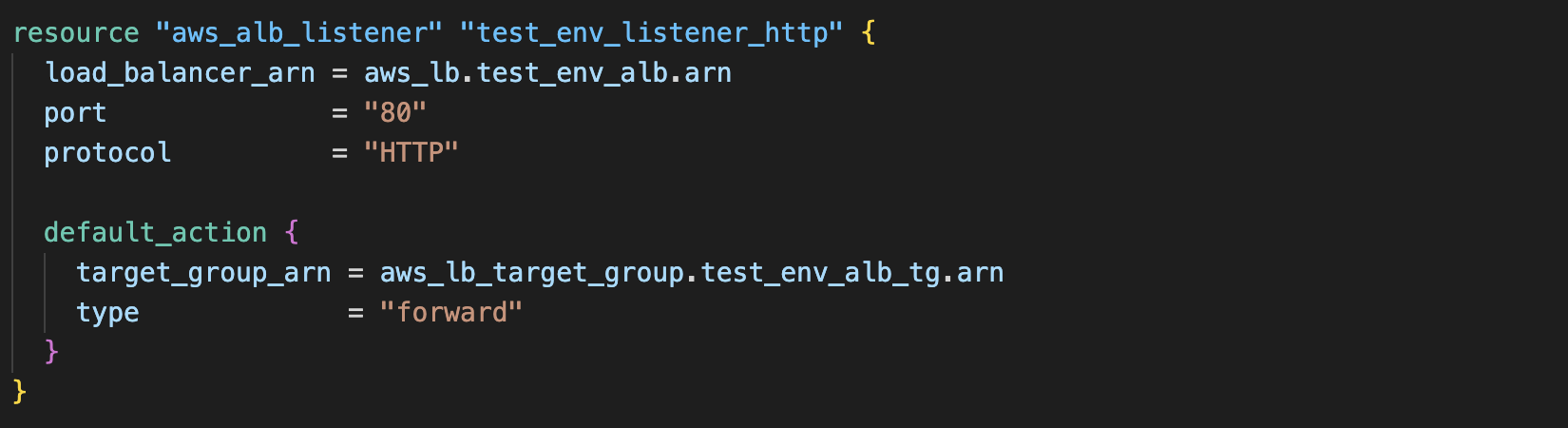
EC2 Instances in Private Subnets behind an application LoadBalancer
Recently, I had to re-visit an old architectural challenge in AWS that I came across a couple of years ago but couldn’t quite remember how to resolve: EC2 instances which have no public IP address (residing in a private subnet) which can accept requests from (and serve responses back to) the internet.
The motivation for this particular topology is security focused: The EC2 instances cannot be directly addressed via the internet due to the absence of a public IP, but can serve (web, in this example) content over the internet using the load balancer....
Notes on Terraform Modules and Variables
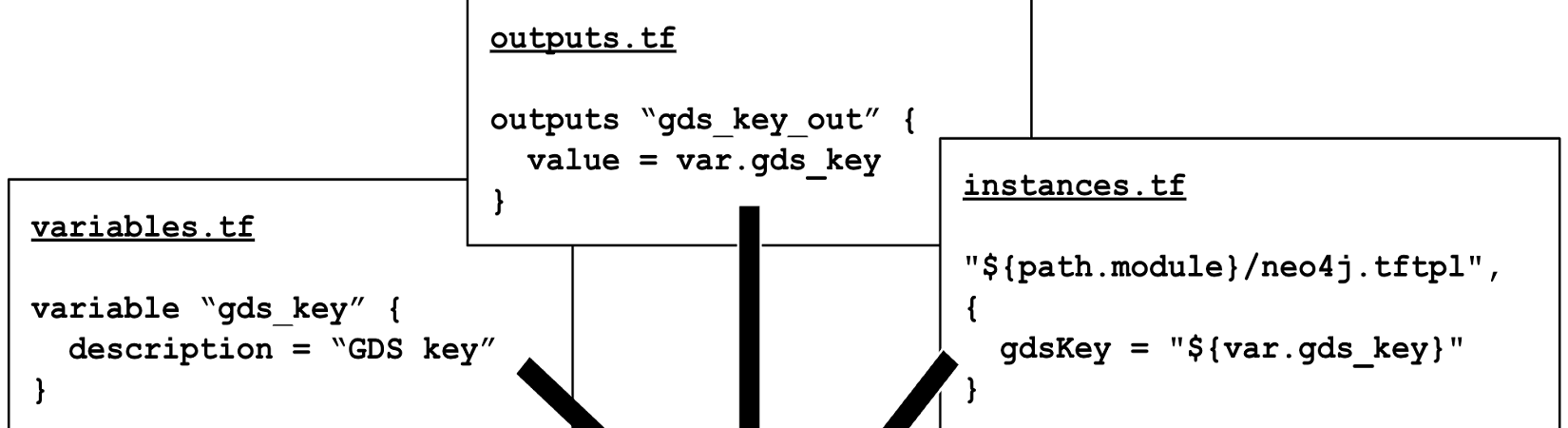
In this post, I outline the steps needed to take an input from a terraform parent (or calling) module and pass it to a config file on a target EC2 instance.
What are Terraform Modules? Using modules in terraform helps to organise and reuse code, allowing a module to be defined once and used many times. For example, a development team may want to quickly create and destroy a number of EC2 instances....
Creating subnets in AWS using terraform with 'count', 'join' and 'element'
The following code snippets show how to create three private subnets in AWS using terraform with ‘count’, ‘join’ and ’element’:
To start with the following variables were declared and set:
terraform.tfvars base_cidr_block = "192.168.0.0/16" node_count = 3 availability_zones = ["a", "b", "c"] variables.tf variable "base_cidr_block" { description = "The base of the address range to be used by the VPC and corresponding Subnets" } variable "availability_zones" { description = "A list containing 3 AZs" type = list(string) } variable "node_count" { description = "The number of ec2 instances to deploy" type = number } Three subnets are then created using a single resource block....
Setting up a home VPN using Wireguard on Mikrotik
I wanted to use create a VPN back to my home network which I could use on the road. The idea was that I could interact with resources on my home network but also have a secure tunnel which I could use if I was needed to use an untrusted WiFi hotspot when in hotels, coffee shops etc.
I had previously implemented OpenVPN to do this, with the VPN server running on a small linux machine inside my home network....
Always-on Internet at Home with 4G Failover
Like most people, my domestic ISP goes down sometimes. I work from home most of the time and the most common solution when this problem occurs is to ’tether’ a phone to use it’s 4G connection. This is OK, but a solution which allowed my entire home network to switch over to a backup internet connection would be much better… As well as my laptop maintaining a connection, movies could still be streamed (backup connection bandwith permitting) and IoT devices would keep working - you get the general idea....
Neo4j & Docker
This is a very quick script to get a single instance of neo4j running in a docker container. The username and password is set using the NEO4J_AUTH environment variable.
#!/bin/bash # # Script: neo4j-docker.sh # Purpose: install neo4j container image after some simple environmentment prep # DOCKER=$(which docker) [ $? == 0 ] || { echo "ERROR: Check if docker is installed (and in your PATH)" ; exit 1; } DATA_DIR="$HOME/docker/neo4j-volumes/data" LOG_DIR="$HOME/docker/neo4j-volumes/logs" IMPORT_DIR="$HOME/docker/neo4j-volumes/import" PLUGINS_DIR="$HOME/docker/neo4j-volumes/plugins" RUNNING_CONTAINER=$($DOCKER ps -a | grep "neo4j:latest" | awk {'print $1'}) [ -z "$RUNNING_CONTAINER" ] || docker rm -f $RUNNING_CONTAINER [ -d $DATA_DIR ] && rm -rf $DATA_DIR/* || mkdir $DATA_DIR [ -d $LOG_DIR ] && rm -rf $DATA_DIR/* || mkdir $LOG_DIR [ -d $IMPORT_DIR ] && rm -rf $DATA_DIR/* || mkdir $IMPORT_DIR [ -d $PLUGINS_DIR ] && rm -rf $DATA_DIR/* || mkdir $PLUGINS_DIR $DOCKER run \ --name testneo4j \ -p7474:7474 -p7687:7687 \ -d \ -v $DATA_DIR:/data \ -v $LOG_DIR:/logs \ -v $IMPORT_DIR:/var/lib/neo4j/import \ -v $PLUGINS_DIR:/plugins \ --env NEO4J_AUTH=neo4j/test1234 \ neo4j:latest
Restoring WebApps
Restoring Web Applications for edrandall.co.uk
Section A - Install & Configure the WebServer with SSL Support
Install the required ubuntu webserver packages aptitude install apache2 php5 php5-mcrypt php5-curl
Create the following webserver configuration files: * /etc/apache2/conf.d/ejr-servers.conf NameVirtualHost 192.168.2.2:443 * /etc/apache2/sites-available/restore.edrandall.co.uk ServerName restore.edrandall.co.uk <VirtualHost 192.168.2.2:443> SSLEngine On SSLCertificateFile /etc/apache2/ssl/server.crt SSLCertificateKeyFile /etc/apache2/ssl/server.key DocumentRoot /var/www/ <Directory "/var/www"> Order deny,allow Deny from all Authname "restore.edrandall.co.uk" AuthUserFile /var/www/.htpasswd AuthType Basic Require valid-user Allow from 192.168.2. Satisfy Any </Directory> </VirtualHost> * /etc/apache2/ports....
RHCE Notes
A) iptables script
#!/bin/bash ipt=$(which iptables) #Flush all existing rules $ipt -F #Set default policies $ipt -P INPUT DROP $ipt -P OUTPUT ACCEPT $ipt -P FORWARD DROP $ipt -A INPUT -i lo -j ACCEPT #Allow stuff back in that we’ve sent out $ipt -A INPUT -m state --state ESTABLISHED,RELATED -j ACCEPT #Allow inbound SSH to this box $ipt -A INPUT -p tcp --dport 22 --source 172.16.0.0/16 -j ACCEPT #Save the rules /sbin/service iptables save #Show the rules $ipt --list -n -v Test (from desktop machine):...
LUKS Encryption on RedHat
Creating an Encrypted Disk Partition
Created a new logical partition (/dev/vda5) which is 500MB in size
After a reboot, check the partition is there and looks okay: fdisk -cul /dev/vda
Prepare the partition for encryption (enter YES and passphrase when prompted): cryptsetup luksFormat /dev/vda5
Unlock the encrypted partition cryptsetup luksOpen /dev/vda5 encpartition
Have a look in the /dev/mapper directory, there’s an entry for /dev/mapper/encrypted partition: lrwxrwxrwx. 1 root root 7 Feb 21 12:24 /dev/mapper/encpartition -> ....
Setting up cobbler for Red Hat Kickstart
Download the epel packages from: http://fedoraproject.org/wiki/EPEL
Edit the files: /etc/yum.repos.d/epel-repo and /etc/yum.repos.d/epel-testing.repo
Uncomment the following line:
#baseurl=http:// Comment the following line (Otherwise yum won’t find the epel packages and won’t work properly.):
mirrorlist=http:// Install cobbler: yum install cobbler policycoreutils-python-2.0.83-19.18.el6.i686 Install mod_python for apache
yum install mod_python Install dhcp
yum install dhcp Install syslinux and syslinux-tftpboot
yum install syslinux syslinux-tftpboot Cobbler and SELinux don’t play nice together. Whilst it is possible to configure cobbler to work with selinux, it is easier to disable it altogether....